



Usage Guideline: How to create a task efficiently & precisely with UDT?
Automated Testing 2025-03-21 16:09 431
The guide provides a step-by-step approach to creating a test task in UDT with high precision and efficiency in the testing process.
UDT is a comprehensive mobile testing platform for large-scale automation on a cloud-based device farm, featuring local access tools for efficient device management by development teams. It supports seamless integration with common automated testing frameworks while offering customization services to extend these frameworks according to specific project requirements. This detailed guide provides a step-by-step approach to creating a test task in UDT with high precision and efficiency in the testing process.
Create Task
Click Automation>Task Management to go to the page.

The current page shows a list of all the tasks that have been created, where you can see the task name, creator, test framework, last execution time, last test ID, etc.
Create a new test task
Click New Task button to enter the task creation page and complete the task creation.

Application Selection
First of all, choose the type of test you need. You can choose Android or iOS system devices to test your application, and then click the button to select an application or upload a new one from local.

After clicking the button, you can see the app management pop-up. Select an app or upload a new one.

Resource Allocation
Select test case, test devices, test Account and configure custom parameters.
Script dependency environment: Choose the script dependency environment, you can choose Python, WeAumatour, Appium or Airtest.

Test Case Library: Select the test case library for this test.
You can go to the test cases page and add a new use case library through git hosting or script uploading.

Select Test Case: Select the test case for this test.
You can select all the cases or specify the test cases to be tested.

Choose Devices: Select the device to be tested this time.
Select the device pool and specific devices you want to test, then click the confirm button.


Test Account:
If you have test account file, you can click it to upload.

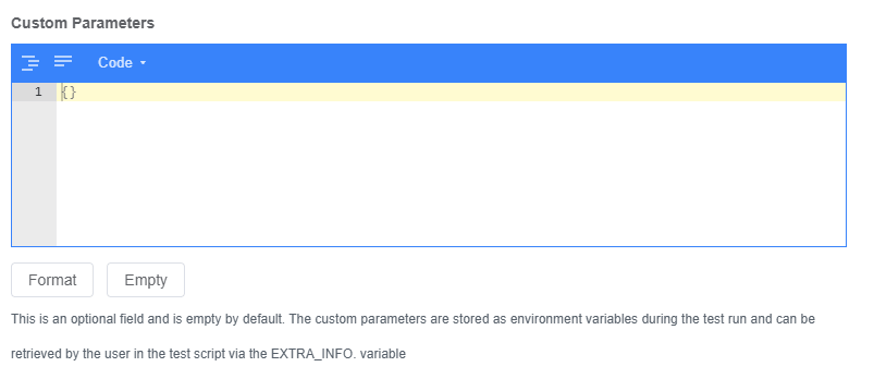
Custom parameters: This is an optional field and is empty by default. The custom parameters are stored as environment variables during the test run and can be retrieved by the user in the test script via the EXTRA_INFO. variable.
Test Execution Configuration
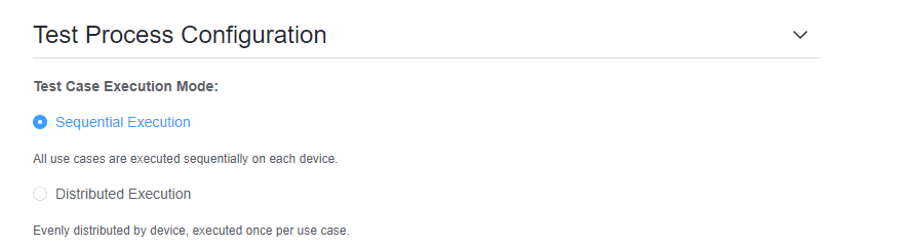
You can configure how tasks are executed, such as whether to automatically pull up the application, execution timeout, etc.
You have two options to choose Execution Mode:
Sequential Execution: All test cases are executed sequentially on each device.
Distributed Execution: Evenly distributed by device, executed once per test case.
You can also set the timeout duration to avoid tasks taking too long to execute.

Depending on your test scenario, choose whether or not to enable the following features.
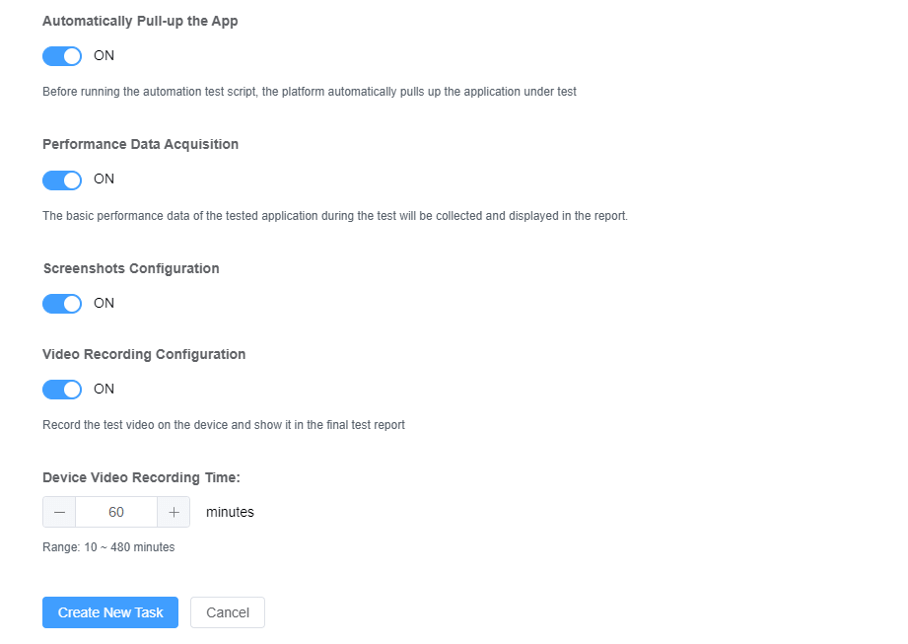
After configuring all the parameters, click the Create New Task button.
Start Your Free Trial on UDT
1. Register to get your UDT account
2. Create a new project in your account
3. Contact us to get free real devices in your project
Also, we are glad to have a meeting with you: Schedule a Meeting with Us
Learn more about UDT platform: WeTest-All Test in WeTest
UDT Demo: WeTest-All Test in WeTest
0
Latest Posts
1GB/T 48140–2026: China's New Automotive Software Quality Standard Explained China's GB/T 48140–2026 redefines automotive software quality management across the full lifecycle. Explore its impact on OTA updates, AI testing, and continuous validation.
2Tencent WeTest at Devcom: Two New AI Testing Solutions, From Fixed Scripts to Autonomous Agents Discover how Tencent WeTest leverages Acorn AI and a reusable visual Agent architecture to transform game QA into an autonomous, closed-loop diagnostic system.
3AI Coding Agents Enter the Testing Loop: From Code Generation to Automated Debugging AI coding agents are evolving from code generators to full software engineering agents that test, debug, and fix code. Learn how runtime context enables automated root cause analysis and why testing becomes more critical than ever.
4Test Management: Practical Lessons for Engineering Team Leads Learn proven test management strategies for technical leaders, including team efficiency optimization, project planning, knowledge accumulation, QCC improvement, and practical team building methods.
5The Path to Test Development: 7 Core Competencies for Modern QA Engineers What makes a senior QA engineer stand out? Explore the 7 core QA competencies including quality-driven execution, team influence, risk governance, process improvement, and technical fundamentals for modern software testing.
Tools
UDT: Auto-Testing Platform
Customized Auto-Testing Platform
Real Device Cloud
PerfDog
CrashSight
PerfSight
Featured Services
APP Compatibility Testing
APP Functional Testing
Mobile Game Hardening
Penetration Testing
Crowd Testing
Localization Quality Assurance
Featured Solutions
Mobile Game Solutions
PC Game Solutions
Overseas Local User Testing Solutions
Mini Program Security Testing Solutions
ISO 9001:2015
Quality Management System Certification
ISO/IEC 20000-1:2018
IT Service Management System Certification
ISO/IEC 27001:2013
ISO/IEC 27001:2013
Copyright © 1998 - 2025 Top Range Mobile Limited.(WeTest.net) All Rights Reserved
